2026 Best Cable Management Baskets for Global Buyers

Modern networks are carrying more data through tighter spaces. A practical cable management basket can keep power cords, patch leads, and fiber routes visible beneath a desk or server rack. It can also reduce pressure on connectors and simplify future maintenance. Small details matter. Sharp edges, weak welds, or crowded routes can create expensive problems.

The Uptime Institute’s 2024 Global Data Center Survey reported that 54% of respondents experienced an outage costing more than $100,000. Cable organization cannot prevent every outage, but it can support safer inspections and faster fault tracing. The Telecommunications Industry Association’s TIA-569 standard also highlights the importance of properly planned pathways and spaces for telecommunications cabling. These references give buyers a stronger basis than appearance alone.

Global purchasing adds more questions. Does the basket support the expected cable weight? Is its coating suitable for humid warehouses or coastal facilities? Are dimensions compatible with local desks, racks, and under-table brackets? Buyers should also check load data, material specifications, mounting hardware, packaging quality, and compliance documents. IEC 62368-1 may be relevant to equipment safety, while local electrical and workplace rules still require separate review. A basket is not automatically compliant.

Some products look sturdy in photographs but flex during installation. That is an easy mistake to make. This guide compares the 2026 best cable management basket options by structure, capacity, finish, installation method, durability, and supplier reliability. It also considers shipping efficiency and after-sales support for international buyers. No single model fits every office or data room. The right choice depends on the route, load, environment, and the installer’s real experience.

2026 Best Cable Management Baskets for Global Buyers

What Cable Management Baskets Are and How They Work

2026 Best Cable Management Baskets for Global Buyers

What Cable Management Baskets Are and How They Work

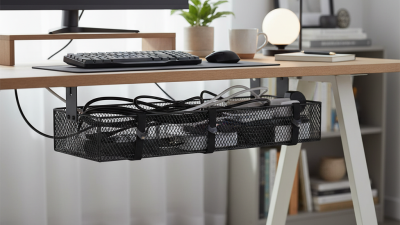
Cable management baskets are open trays that organize wires beneath desks, worktables, and equipment racks. They reduce floor clutter and prevent cables from becoming tangled. Common materials include coated steel, aluminum, and rigid recycled plastic. Most baskets attach with screws, clamps, or adhesive mounts. The best mounting method depends on the desk surface and cable weight.

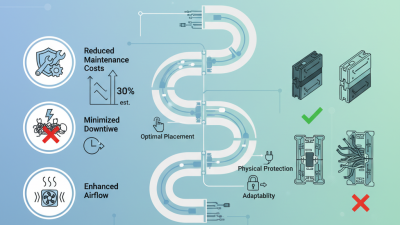
A basket supports cables while allowing air to circulate around them. Wires enter from several directions and remain elevated above the floor. Cable ties or reusable straps keep each group in place. Power strips should sit securely, without pressing against sharp edges. Avoid overfilling the basket. Tight bends can damage cable jackets and increase maintenance problems. Open designs are easier to inspect, although they may collect dust. This trade-off is easy to underestimate.

Tips: Measure the desk underside before buying. Leave spare space for future cables. Check the basket’s load capacity and mounting hardware. Global buyers should also verify local plug standards and power-strip certifications. A basket does not regulate voltage or repair unsafe wiring. I once planned too little space for adapters, and the installation looked neat only briefly. That mistake is worth reconsidering before ordering.

Key Features Global Buyers Should Compare

When comparing cable management baskets for global procurement, start with load capacity and usable dimensions. A basket should hold power strips, adapters, and bundled cables without bending. Measure the desk or rack before ordering. Small errors create installation problems.

Material choice also matters. Powder-coated steel offers rigidity, while treated metal can better resist humid environments. Check coating quality, edge finishing, and ventilation gaps. Sharp edges can damage insulation during daily adjustments. They should not exist.

Review mounting methods, too. Clamp, screw, and under-desk options suit different furniture and workplace rules. Clear instructions reduce assembly mistakes across multilingual teams.

Global buyers should examine cable entry points and maintenance access. Workers need to add or replace cables without removing the entire basket. Compare packaging size, flat-pack efficiency, and replacement hardware availability. These details affect freight costs and long-term reliability.

Ask for test data, dimensional drawings, material specifications, and warranty terms. Do not rely on product photos alone. A polished image can hide weak brackets or limited clearance. I once underestimated adapter depth, and the basket looked suitable until installation. That mistake showed why real device measurements matter. Buyers should also confirm corrosion expectations, installation surfaces, and relevant local product requirements before placing large orders.

Top Cable Management Basket Types for Different Workspaces

Cable Management Baskets for Global Buyers

Under-desk baskets suit offices with desktop computers, monitors, and shared power strips. Mesh steel baskets allow heat to escape and make dust easier to spot. Solid trays look cleaner, but they may hide loose adapters and damaged cables. For sit-stand desks, choose a flexible basket with enough slack for full-height movement. Measure the cable path before buying. A basket that fits a fixed desk can fail on a moving frame.

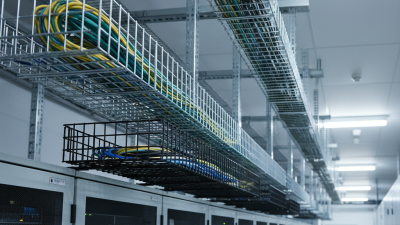
Clamp-on baskets work well for rented offices because they avoid drilling. They attach near the rear edge and keep charging cables within reach. Screw-mounted baskets provide stronger support for heavy adapters, docking stations, and long extension cords. Wall-mounted baskets free valuable floor space in small rooms. They can hold network cables above a server cabinet or behind a meeting-room display. Check the wall material and mounting load carefully. A weak fixing point creates more trouble than visible cables.

For gaming or editing workspaces, deep baskets prevent thick power cords from falling onto the floor. Narrow trays suit hotel desks, reception counters, and compact home offices. Some users prefer baskets with cable-routing openings on both sides. This reduces sharp bends near plugs. I once selected a tray that looked spacious, yet its rear opening was too small for a large adapter. The mistake was avoidable. Compare internal dimensions, ventilation, coating quality, and installation clearance rather than judging appearance alone.

2026 Best Cable Management Baskets for Global Buyers - Top Cable Management Basket Types for Different Workspaces

Basket Type Best Workspace Typical Construction Typical Size Range Approximate Cable Capacity Typical Load Range Installation Method Main Advantages Important Buying Considerations
Under-Desk Wire Basket Home offices, open-plan desks and standard workstations Powder-coated steel wire with an open mesh structure 450–700 mm wide × 100–180 mm high × 100–160 mm deep Approximately 6–12 standard power and data cables About 5–15 kg, depending on the mounting system Screws fixed to the underside of the desk Balanced choice
Good ventilation, easy cable access and broad desk compatibility
Check desk thickness, screw clearance, basket depth and the number of cable-entry openings
Large Cable Tray Basket Conference tables, shared workstations and sit-stand desk clusters Heavy-gauge steel mesh or perforated steel tray 600–1200 mm wide × 100–200 mm high × 120–220 mm deep Approximately 10–25 mixed power, monitor and network cables About 10–25 kg when correctly secured Multiple screw points, brackets or clamp-supported mounting High capacity and better support for power strips and adapter blocks Confirm the underside structure and allow clearance for desk-height adjustment mechanisms
Clamp-On Cable Basket Rental offices, temporary workstations and desks that should not be drilled Steel wire or aluminum basket with adjustable desk clamps 300–600 mm wide × 100–170 mm high × 100–160 mm deep Approximately 5–10 standard cables About 3–8 kg, depending on clamp design Tool-free or low-tool clamp attachment Removable, reusable and suitable for leased furniture Measure desk-edge thickness; verify clamp opening, pad protection and clearance below the desktop
Under-Desk Cable Trough Electric height-adjustable desks and hot-desking areas Steel or reinforced polymer trough with a continuous cable channel 500–1000 mm wide × 80–150 mm high × 100–180 mm deep Approximately 8–20 cables, depending on cable diameter About 5–15 kg Screws, brackets or manufacturer-compatible mounting rails Keeps cables contained while supporting repeated desk movement Look for flexible end sections, strain relief and enough slack for the full sitting-to-standing travel range
Vertical Cable Basket Standing desks, reception counters and narrow workstations Vertical steel mesh or rigid plastic channel with cable-retaining openings 300–700 mm high × 80–150 mm wide × 70–130 mm deep Approximately 4–10 cables About 3–10 kg Desk-side screws, clamps or adhesive-backed mounting hardware Uses limited horizontal space and directs cables neatly to the floor Check the vertical route, bend radius, floor clearance and compatibility with moving desk frames
Power-Strip Storage Basket Small offices, study desks and workstations with multiple chargers Steel mesh or ventilated polymer body with a retaining lip 300–500 mm wide × 100–160 mm high × 100–180 mm deep One power strip plus approximately 4–8 connected cables About 3–8 kg Underside screws, clamps or a dedicated mounting bracket Separates adapters from the floor and improves airflow around the power strip Measure the power strip, plug spacing and cord-exit direction; do not cover ventilation openings
Wire Management Basket with Lid Client-facing offices, executive desks and presentation areas Powder-coated steel or molded polymer basket with a removable cover 300–600 mm wide × 100–180 mm high × 100–200 mm deep Approximately 6–15 cables, depending on the lid design About 4–12 kg Screw-fixed or bracket-mounted under the desk Conceals adapters and creates a cleaner visible workspace Confirm lid clearance, access frequency, heat dissipation and whether cables can exit from both ends
Corner Cable Basket L-shaped desks, corner workstations and compact home offices Triangular or angled steel wire frame with a coated finish 250–450 mm wide × 100–170 mm high × 100–180 mm deep Approximately 4–9 standard cables About 3–8 kg Corner screw mounting or adjustable brackets Uses otherwise difficult-to-access corner space efficiently Check the corner geometry, desk-support position and cable bend space around the rear edges
Modular Cable Basket System Large offices, training rooms and changing workstation layouts Interlocking steel or polymer sections with extension pieces Base length 300–600 mm; expandable to approximately 1200 mm or more Approximately 6–25 cables, depending on the assembled length About 5–20 kg, depending on support spacing Screws, brackets, clamps or rail-mounted connectors Flexible sizing and easier adaptation to different desk widths Verify connector strength, maximum unsupported span and whether extra sections are available internationally
Floor-Standing Cable Basket Server-room work areas, AV stations and desks without usable underside space Freestanding powder-coated steel mesh with a stable base 300–600 mm wide × 250–500 mm high × 150–250 mm deep Approximately 8–20 cables and small power adapters About 5–15 kg Freestanding; optional wall or furniture restraint may be used No drilling required and easy to reposition during workspace changes Use only where the basket cannot obstruct walkways; check base stability and cleaning access

Note: Size, capacity and load figures are typical market ranges for product selection. Actual performance depends on material thickness, mounting hardware, cable diameter, installation quality and the manufacturer’s tested specifications.

Materials, Sizes, Installation Methods, and Load Capacity

2026 Best Cable Management Baskets for Global Buyers

Materials, Sizes, Installation Methods, and Load Capacity

Material affects durability, weight, and heat resistance. Powder-coated steel suits crowded office setups and heavier power strips. Aluminum resists corrosion and remains relatively light. Recycled plastic costs less, but may flex under concentrated weight. Bamboo looks warmer, though moisture can shorten its service life. Small details matter. Check edge finishing before purchase, because sharp rims can damage cable jackets.

Measure twice. A basket should hold cables loosely, without forcing sharp bends. Common lengths range from 300 to 900 millimeters, while depths often range from 80 to 150 millimeters. Leave extra space for adapters and future cables. I once selected a narrow tray that looked tidy but failed after adding two chargers. That mistake changed my buying checklist.

Installation depends on the desk and expected load. Screw-mounted baskets offer the most stable support for fixed workstations. Clamp-mounted models suit rented offices and adjustable desks. Adhesive mounting is convenient, but it needs a clean surface and modest weight. Review the stated load capacity, mounting hardware, and test conditions together. A 10-kilogram rating may assume evenly distributed weight, not one heavy adapter. For global purchasing, request dimensional drawings, material details, and clear installation instructions. Compare measurements in millimeters and confirm the hardware matches your desk thickness. Reliable specifications matter more than attractive photographs.

How to Choose Reliable Suppliers and Evaluate Total Cost

2026 Best Cable Management Baskets for Global Buyers

How to Choose Reliable Suppliers and Evaluate Total Cost

A reliable basket starts with evidence, not attractive product photos. Request load tests, coating specifications, material certificates, and sample inspections. For steel baskets, check wire diameter, weld consistency, corrosion resistance, and mounting strength. IEC 61537 provides useful guidance for cable support systems, although not every basket follows it directly. That limitation matters.

Supplier evaluation should include production capacity, quality-control records, export experience, and replacement procedures. Ask for inspection photos from several batches, not one perfect sample. The International Trade Centre notes that logistics costs vary significantly by route, product type, and shipment volume. Therefore, compare delivered cost, not factory price. Include tooling, packaging, inland transport, insurance, duties, customs fees, and possible defect rates.

The U.S. Department of Energy’s 2024 data-center report estimates American data centers used about 176 terawatt-hours in 2023. Cable organization supports safer maintenance in these dense environments, even if baskets do not reduce energy use directly. Calculate total cost over five years: purchase price, installation labor, replacement parts, corrosion risk, and downtime exposure. A cheaper basket may require more fasteners or frequent adjustments. My own purchasing checklists are not perfect. Small details, such as missing hardware or unclear carton labels, can create expensive delays. Require pre-shipment inspection and written acceptance criteria. Reliability is measurable, but never perfectly predictable.

2026 Best Cable Management Baskets for Global Buyers

How to choose reliable suppliers and evaluate total cost

This planning benchmark compares typical basket categories using a three-year landed-cost model. The estimate includes purchase price, international freight, import-related costs, and installation. Steel mesh baskets generally offer higher load capacity and durability, while plastic and recycled-plastic options can reduce initial cost and shipping weight. Buyers should verify material thickness, load rating, corrosion resistance, packaging efficiency, factory audit results, warranty terms, and sample approval before placing a volume order.

Cost figures are indicative USD benchmarks per installed unit for international procurement planning and exclude local taxes, major electrical work, and currency fluctuations.