
For over 50 years, we have dedicated ourselves to providing Industry with best in class wire management solutions and to helping solve mission critical issues.

The needs of today’s schools and universities are changing fast. When it comes to anticipating and meeting those needs, MonoSystems is in a class of its own.

For the past five decades, we’ve made it our business to offer more value to our partners, which in turn provides greater value to their customers.
The Dell PowerEdge R760xa GPU Server is a rack-mounted system designed to accelerate demanding computing tasks. Its 2U chassis combines server-class processing, memory, storage, and support for high-performance GPUs. Depending on its configuration, it can accommodate multiple accelerator cards, but the exact options vary by model and build. That matters. A server’s capabilities depend on more than its GPU count.
Organizations may consider the R760xa for artificial intelligence, machine learning, scientific computing, and other GPU-intensive workloads. Yet a powerful specification sheet does not guarantee faster results. Software compatibility, cooling, power capacity, and workload design all affect real-world performance. Not every workload benefits. This overview introduces the server’s core design and intended use, then considers configuration choices and practical deployment factors. It also asks a useful question: does this platform fit the task, or is it simply more hardware than the workload needs? That distinction can be easy to miss. A careful evaluation should weigh performance goals against infrastructure requirements, operating costs, and the applications already in use.
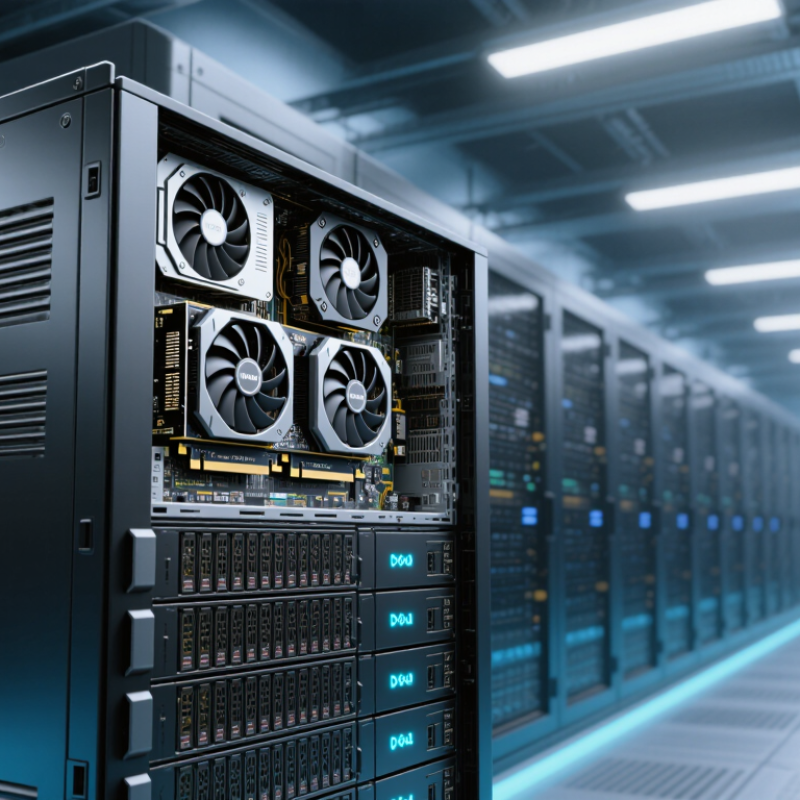
This 2U rack server is built to run demanding workloads with multiple graphics accelerators. Selected configurations support up to four double-width GPUs, alongside dual server processors, DDR5 memory, and PCIe Gen5 connectivity. That combination can suit AI development, scientific computing, rendering, and other tasks that benefit from parallel processing. It is not a desktop computer scaled up; it needs suitable rack space, power, and cooling.
The practical benefit is compute density. Several accelerators can sit in one chassis, reducing the number of separate systems an organization must manage. Yet more GPUs do not automatically mean faster results. Software support, memory capacity, data movement, and workload design all matter. A poorly matched job may leave expensive hardware waiting.
Plan the room before choosing a configuration. Check rack depth, electrical capacity, airflow, and the cooling system’s ability to handle concentrated heat. Fans can be loud under sustained load. That detail is easy to overlook. Storage and networking also shape performance, especially when training jobs repeatedly move large datasets. For many teams, the right configuration is less obvious than the headline GPU count. Careful testing with representative workloads is a sensible way to expose bottlenecks, though test results may not predict every production condition.
A 2U GPU server is designed around a simple constraint: several accelerators must fit, communicate, and stay cool in limited rack space. The R760xa platform supports up to four double-width GPUs, alongside dual processors and PCIe Gen5 connectivity. That layout can reduce data-transfer bottlenecks between processors, accelerators, and high-speed storage. It also concentrates heat. The fans and front-to-back airflow are not minor details; they help keep workloads stable when all accelerators are busy. Small design choices matter.
The Stanford Institute for Human-Centered AI’s 2024 AI Index reports that compute used to train notable AI models has doubled roughly every five months. That trend helps explain the focus on accelerator density and fast interconnects. Power is the harder trade-off. The International Energy Agency estimated data centers used about 460 terawatt-hours of electricity in 2022, with demand potentially exceeding 1,000 terawatt-hours by 2026. Those figures cover more than GPU servers, but they underline why efficient cooling and power delivery matter. A four-GPU chassis can offer substantial compute in a compact footprint. Yet dense hardware can make service access and airflow less forgiving. That compromise deserves attention during deployment.
Higher PCIe bandwidth helps move data between GPUs, CPUs, and storage. The chart shows theoretical one-way bandwidth for a x16 link, calculated using PCIe's per-lane transfer rate and encoding efficiency; real-world throughput is lower.
The 2U GPU server supports two processor sockets, 32 DDR5 memory slots, and PCIe Gen5 expansion. Depending on the chosen configuration, it can accommodate up to four double-width GPU accelerators. Storage and networking options vary by chassis and selected risers, so check the exact bill of materials before planning a deployment. Redundant power supplies are available for workloads where a single power-supply failure would cause disruption. More GPUs are not automatically better; power, cooling, and software compatibility can limit real performance.
That balance matters as AI workloads grow. The 2024 Worldwide AI and Generative AI Spending Guide projects global AI spending will reach $632 billion by 2028, with a 29% annual growth rate from 2024. This is a forecast, not a guarantee, but it signals why scalable compute is attracting attention. For inference or model development, match accelerator memory and interconnect needs to the workload, then validate airflow and rack power with measured demand. Dense configurations can run hot.
Tips: Confirm GPU support, riser layout, drive bays, and power capacity for the exact system configuration. Test your workload before scaling.
The R760xa is a GPU-focused rack server designed to place accelerator capacity close to CPUs, memory, and high-speed storage. That balance matters when workloads move large datasets repeatedly. It can be configured for demanding parallel tasks, though results depend on GPU choice, memory, cooling, and software.
AI training and inference are natural fits. Training can process image, language, or scientific data across accelerators; inference can serve multiple requests with predictable latency. Not every model needs this much hardware. Smaller models may run more economically on a modest system, so workload sizing should come before purchase.
It can also support high-performance computing, including simulation, computational fluid dynamics, and research workloads that divide calculations across GPUs. Teams can use it for video rendering, virtual desktop infrastructure, and data analytics when many users or jobs compete for compute. Those jobs benefit from careful scheduling and fast data access. Heat and power are real constraints. A dense GPU server may need stronger facility cooling, and poorly tuned software can leave expensive accelerators waiting. Pilot the actual workflow, measure throughput and energy use, then adjust the configuration. It depends.
Deploying a 4U GPU server starts with a rack survey, not a workload spreadsheet. Check rack depth, rail clearance, power circuits, and airflow before installation. Leave room for service access; dense accelerator nodes can turn a neat rack into a difficult one. The International Energy Agency’s 2024 report estimates that data-centre electricity use could exceed 1,000 terawatt-hours by 2026. That makes power budgeting a practical deployment task, not an afterthought. Record expected draw under realistic GPU loads, then confirm cooling capacity at the rack and room levels.
For management, connect the server’s remote controller to a restricted administration network and set named user accounts. Use its console to monitor temperatures, fan speeds, power, and hardware alerts; schedule firmware updates during a maintenance window. Keep configuration records alongside asset and warranty details. Small steps. They help during a late-night fault. For clusters, standardize operating-system images and GPU drivers, then test a small group before wider rollout. The 2024 Uptime Institute Global Data Center Survey identifies power availability as a leading data-centre concern, reinforcing the value of alerting and capacity checks. Still, telemetry is not a substitute for inspection: a sensor may look normal while a cable or airflow path is poorly arranged. Review logs after the first sustained training run, and adjust limits where measurements disagree with expectations.
| Dimension | Server Details | Deployment and Management |
|---|---|---|
| Server type and form factor | A 2U rack-mounted server designed for compute-intensive workloads that use GPU acceleration. | Install in a compatible rack with appropriate rail support, airflow clearance, power capacity, and data-center cooling. |
| Processor | Supports up to two fourth-generation server-class processors; the selected processor configuration determines available cores and supported features. | Choose processors to match application licensing, CPU-side preprocessing needs, and the planned accelerator workload. |
| GPU acceleration | Supports selected configurations with up to four double-width GPUs or up to eight single-width accelerators. Supported models and combinations depend on the system configuration. | Confirm accelerator compatibility, workload software support, power requirements, and cooling limits before ordering or installing hardware. |
| System memory | Provides 32 DDR5 memory slots. Supported memory capacity and speed depend on the processor, memory modules, and system configuration. | Populate memory according to the platform's channel and slot-installation rules; review memory status through system management tools. |
| Storage | Drive options vary by chassis configuration and can include supported 2.5-inch SAS, SATA, or NVMe storage devices. | Select drive type and capacity for the workload, then configure storage redundancy and data protection to meet service requirements. |
| Expansion and connectivity | PCIe Gen 5 expansion is available in supported configurations for accelerators, network adapters, and storage controllers. | Plan slot usage before deployment, accounting for accelerator placement, network bandwidth, and any required storage or fabric adapters. |
| Typical workloads | Suitable for workloads such as AI training and inference, machine learning, graphics processing, and other parallel computing tasks when configured with compatible accelerators. | Benchmark with the intended software and data set; verify accelerator drivers, runtime libraries, and application compatibility. |
| Operating system and software | Operating-system and hypervisor choices depend on the workload and on current hardware and accelerator support. | Standardize installation images, driver versions, security settings, and update procedures across the server fleet. |
| Provisioning | Hardware configuration can be prepared for bare-metal use or for a supported virtualized environment. | Document firmware and hardware settings, automate repeatable operating-system deployment, and validate network and storage access after installation. |
| Monitoring and remote administration | An embedded management controller provides out-of-band access to system health and hardware administration features. | Use a secured management network to monitor hardware alerts, review inventory, access a remote console, and perform supported power operations. |
| Firmware and maintenance | Firmware updates and maintenance options depend on the installed components and supported update packages. | Test updates in a maintenance window, keep a record of versions, and follow compatibility guidance for processors, accelerators, adapters, and system firmware. |
| Power, cooling, and airflow | GPU-equipped configurations can draw substantial power and generate significant heat; requirements vary with installed components. | Check power supply sizing, rack power delivery, room cooling capacity, and airflow direction for the complete configured system. |
| Security and access control | Security capabilities depend on the system configuration and enabled firmware and management features. | Restrict management access, use strong unique credentials, apply role-based permissions, and keep firmware and operating systems current. |
| Configuration note | Available features, drive counts, accelerator support, and performance depend on the exact hardware configuration and applicable support documentation. | |